

Product Updates
The latest features, improvements, and fixes from the team.
2026
Construction CRM for Project Management
Manage construction projects, client communication, and site activities from one platform. Track leads, contractors, project tasks, and important documents while keeping every stage of the construction workflow organized.
Employee Skill Management
Store and manage employee skills, certifications, and expertise in a centralized system. Easily identify the right people for specific tasks and ensure better team planning for projects.
Basic Ask AI Smart Integration
Use AI-powered assistance to quickly analyze data, generate insights, and get instant answers within the system. This helps teams work faster and make more informed decisions.
Customer Onboarding Process Management System
Create a structured onboarding experience for new customers by organizing tasks, documents, and communication in one workspace. Ensure every client receives a smooth and professional onboarding process.
Calendly Integration for Meeting Scheduling
Automatically schedule meetings and demos by connecting with Calendly. Sync appointments, reduce manual scheduling, and streamline meeting coordination with prospects and clients.
WhatsApp Integration for Customer Communication
Communicate with customers instantly through WhatsApp. Send updates, follow-ups, and support messages while keeping conversations organized within customer records.
Manufacturing CRM for Sales Management
Coordinate customer orders, production activities, and sales processes in one place. Improve collaboration between sales and manufacturing teams while maintaining clear visibility into every order.
End-to-End Solar Lead Management
Capture, track, and manage all solar leads in one centralized system with clear status, source tracking, and follow-up reminders to ensure no opportunity is missed.
Site & Property Master Management
Maintain complete site profiles including roof details, electrical info, approvals, and location data to ensure faster planning and error-free execution.
Survey Documentation with Photos & Videos
Upload and organize site photos, videos, drawings, and notes in one place to create standardized, professional survey records for every installation.
Intelligent Solar Assessment & ROI Calculator
Automatically calculate system size, power generation, savings, and ROI to generate data-backed recommendations and customer-ready assessment reports.
Auto-Generated Professional Estimates
Create branded, accurate solar estimates in minutes using data directly from surveys and assessments with automatic calculations and PDF export.
BOQ & BOM Based Material Planning
Generate project-wise Bill of Quantities and cross-project Bill of Materials to ensure accurate procurement, better inventory planning, and zero site delays.
Project Stage Tracking & Execution Workflow
Track every installation across defined stages with live status, timelines, and team assignments to keep projects on schedule and customers informed.
Milestone-Based Payment Management
Define payment schedules, track due and received payments, send automated reminders, and get a clear view of your cash flow at any time.
Maintenance Scheduling & Service History
Plan recurring maintenance, assign technicians, record service history, and maintain warranty-proof documentation for every installed system.
Business Intelligence & Performance Dashboards
Track sales, project profitability, revenue, conversion rates, and growth trends with management-ready dashboards and exportable reports.
Manufacturing Work Orders & Job Management
Create and manage production jobs with due dates and stage-wise progress tracking. Get complete visibility from raw materials to finished goods and keep production schedules under control.
Bill of Materials (BOM) Based Production Planning
Define product structures with components and quantities and automatically drive material planning. Reduce stock errors, improve accuracy, and avoid last-minute procurement.
Material Requisition & Consumption Tracking
Request, reserve, and record actual material usage directly against jobs. Maintain real-time inventory accuracy and improve cost control across production.
Multi-Stage Production Routing
Track jobs across stages like cutting, assembly, and finishing with live progress updates. Identify bottlenecks early and prevent schedule slippages.
Production Scheduling & Capacity Visibility
See what’s planned, spot resource conflicts, and track delays before they impact delivery commitments.
In-Process Quality Checks
Build inspections directly into production workflows and record results at every stage to reduce rework and returns.
Finished Goods Receipt to Inventory
Close production jobs and automatically update finished goods inventory for real-time stock visibility.
Production Cost & Waste Tracking
Track planned vs actual material usage, monitor waste, and analyze variances to improve margin control and operational efficiency.
Central Asset Register
Manage all machinery and equipment in one place with serial numbers, locations, warranty details, and purchase history.
Preventive Maintenance Scheduling & Work Orders
Schedule recurring maintenance and create repair work orders to reduce breakdowns and improve equipment uptime.
Asset Maintenance History & Cost Tracking
Maintain complete service logs including parts used, vendors, and repair costs to lower total cost of ownership.
Asset Downtime & Availability Tracking
Track out-of-service periods and monitor asset uptime to improve reliability and maintenance planning.
Asset Alerts & Warranty Reminders
Receive automatic notifications for maintenance schedules, calibrations, and warranty expiries so nothing is missed.
Asset Document Attachments
Attach manuals, invoices, certificates, and photos directly to asset records for easy audits and service execution.
2025
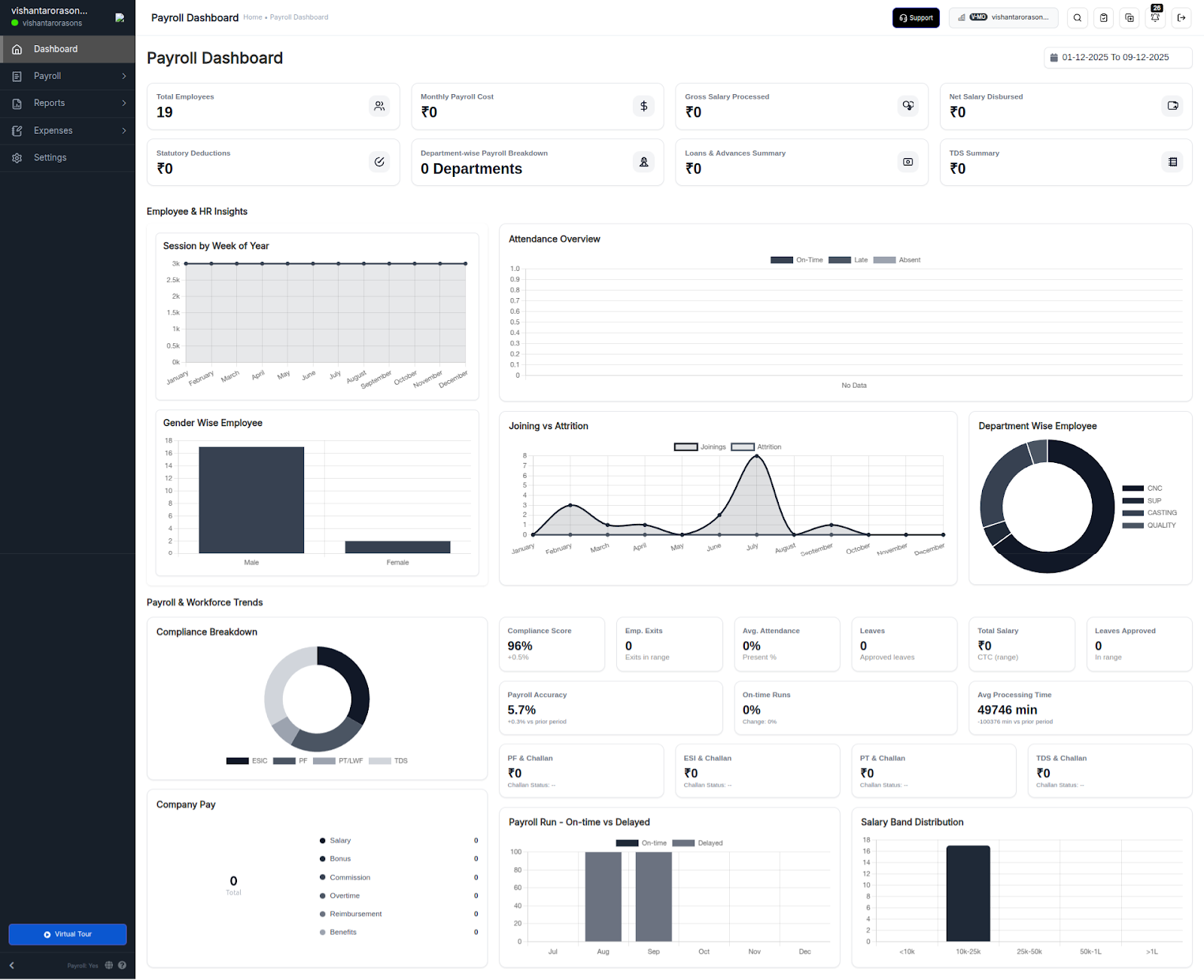
Brand-New Payroll Dashboard
A fresh, intuitive payroll dashboard offering real-time insights on payouts, trends, and compliance. Built to help HR and finance teams stay informed, accurate, and efficient.
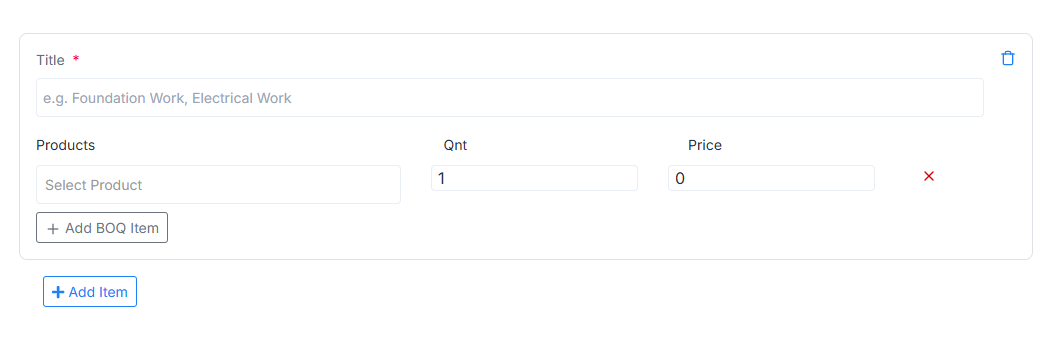
BOQ for Manufacturing Module
Easily add and manage materials, services, labor teams, and pricing for precise production planning. A streamlined BOQ workflow that reduces errors, improves cost control, and boosts operational efficiency.
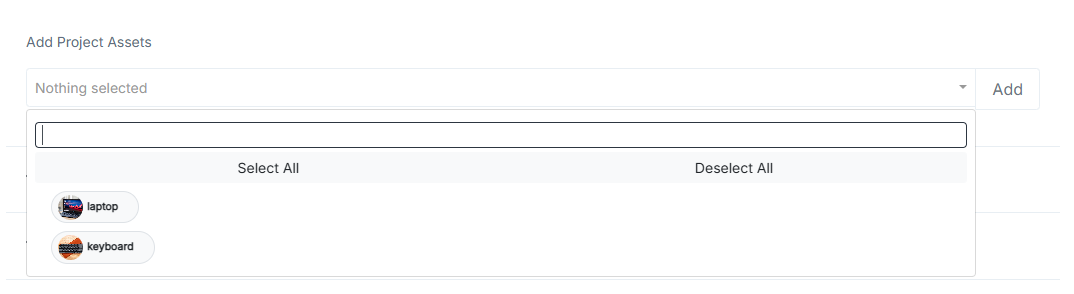
Add & Manage Project Assets
Track machinery, equipment, and project assets with simple add, edit, and delete options. Enhance accountability and ensure optimal asset utilization across every project.
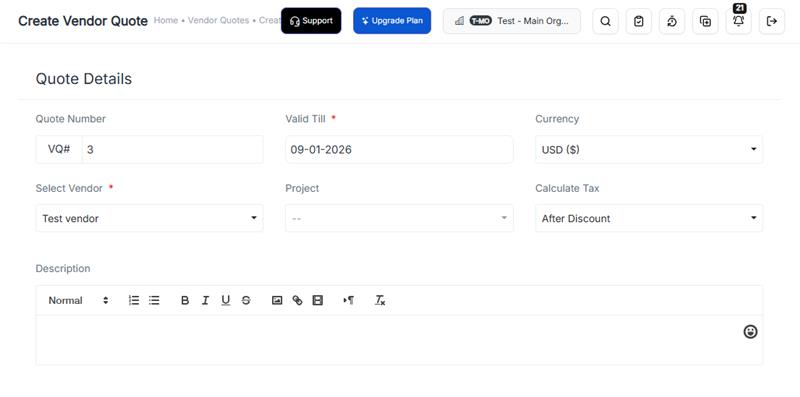
Vendor Quotes for Smarter Purchasing
Create detailed vendor quotes and reuse them to generate multiple purchase orders effortlessly. Speed up procurement, maintain pricing accuracy, and eliminate repetitive data entry.
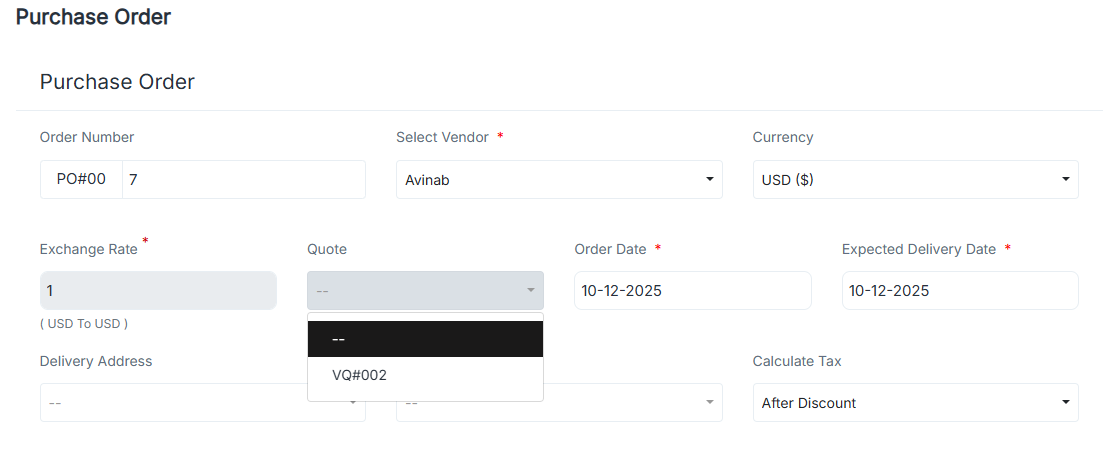
Turn Vendor Quotes into Purchase Orders
Compare multiple vendor quotes and turn the best one into a purchase order instantly. A seamless, click-efficient flow that accelerates procurement and improves vendor decisions.
Free Tools: Payslip & Invoice Generators
We’ve introduced two new free tools to simplify daily business operations — the Payslip Generator and Invoice Generator. Easily generate professional documents in seconds, with no signup needed.
Payroll Launch for Tax Consultants
CrmLeaf now offers a dedicated Payroll module designed specifically for tax consultants. Manage multiple clients, automate compliance, and streamline month-end payroll processing with ease.
Removed Data Deletion Page
We removed the deprecated Data Deletion page and cleaned up related slug routing to avoid broken links and unused navigation elements.
Hero Image Updates
Random hero images were refreshed to improve visual appeal and consistency, ensuring a more engaging browsing experience across key landing pages.
Component Readability Upgrade
The Story Timeline component was refactored to improve readability and structure, making future updates and maintenance more efficient for the development team.
CRM Dashboard Improvements
We rolled out updated CRM dashboard versions with improved filters, clearer stats, and a smoother navigation experience for faster decision-making.
Deals & Pipeline Fixes
Multiple fixes were applied to improve Deals pipeline reliability, data sync behavior, UI alignment, and conflict handling during updates.
Deals New Design
A refreshed Deals UI is now live with improved layout, better visual hierarchy, and easier stage navigation for users managing opportunities.
Free Tool API Update
Free Tool API version 6 has been deployed with improved performance, stability enhancements, and better error-handling for external integrations.
Sidebar Usability Enhancements
Improved sidebar visibility, spacing, and background layering to provide a cleaner experience, especially in help center sections and multipage navigation views.
Improved Content Sorting Logic
Help center and academy pages now sort categories dynamically using CPTCustomDate to ensure the most relevant and latest content appears first.
Search Upgrade in Academy
Academy search functionality was enhanced with new typing support and faster query response to help users find learning resources easily.
ECR Report Download Added
Users can now directly download ECR reports in one click, improving payroll export workflows and simplifying documentation needs.
Payroll Excel View Added
Payroll now supports Excel-based viewing for clearer formatting and improved readability during payroll data audits and reviews.
HRMS Attendance Import
HR teams can now import attendance files directly, saving manual processing time and improving onboarding efficiency.
Pricing Page Improvements
The pricing table layout was updated with clear headings and spacing adjustments to improve readability and user decision confidence.
Slug Exclusions Added
Payroll-offer and similar inactive routes were excluded from slug logic to avoid unwanted indexing and improve navigation clarity.
UI Refinements and Cleanup Sep 18, 2025
Minor refinements across layout spacing, mobile alignment, and tab navigation were applied to standardize the UI across pages.
Employee Age & PF
A new payroll feature now calculates PF based on age eligibility rules, ensuring improved compliance and automated deductions.
Improve Signup Experience
Signup flow improvements include timeout fixes, validation updates, and smoother activation experience for new users onboarding HRMS or payroll.
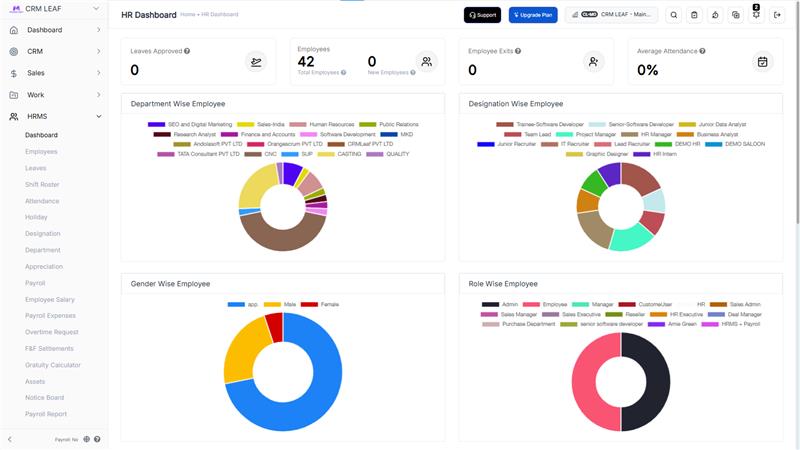
HRMS Dashboard Update
A dedicated HRMS dashboard is now live, displaying attendance, payroll timelines, leave summary, and employee status insights.
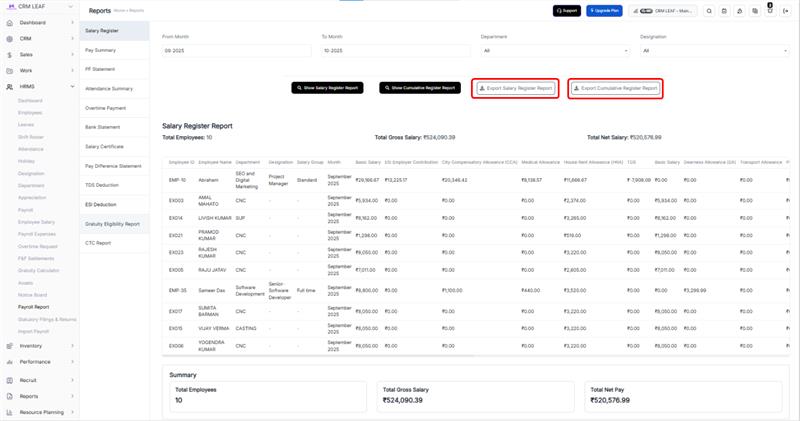
Payroll Report Enhancements
Payroll report formatting and calculations have been refined to ensure accuracy, faster loading, and cleaner report exports.
Major Navbar Improvements
The Navbar was upgraded with dynamic rendering, improved responsiveness, and better mobile navigation, ensuring smoother browsing across all screen sizes.
New Pricing Tags Added
A new dynamic pricing tag component was introduced to display pricing and plan benefits more clearly based on user interaction.
Mobile App Section Added
We added a dedicated Mobile App section and new homepage components to highlight mobile-first features and user benefits.
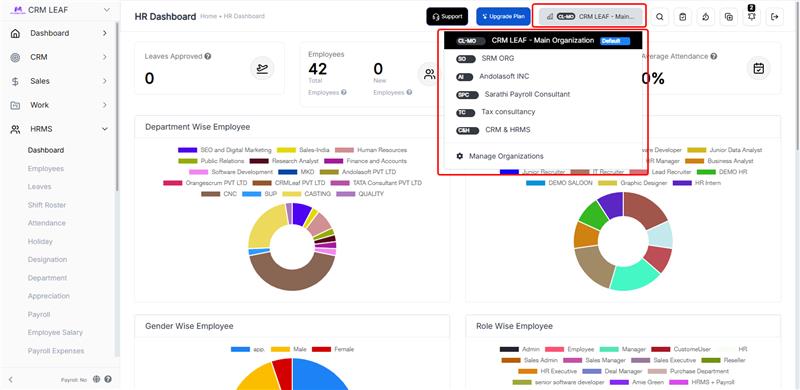
Multi-Organisation System
Multi-organisation support is now available, enabling users to manage multiple branches or entities under one login with separated datasets.
Payroll Live Updates
Multiple payroll-related updates were released to improve live calculations, reporting, and component-level fixes.
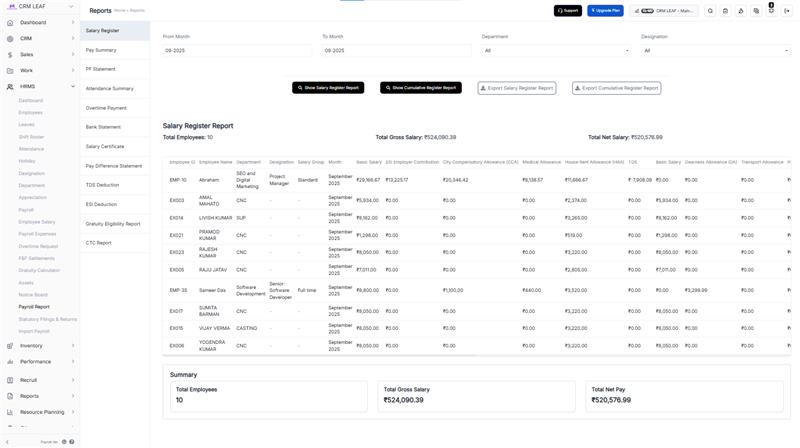
Post-Submission Fixes
We improved post-submission validation rules, error prevention logic, and workflow handling for better stability across modules.
Payroll Enhancements
Payroll module received UI and logic improvements to streamline processing, improve field clarity, and speed up workflow execution.
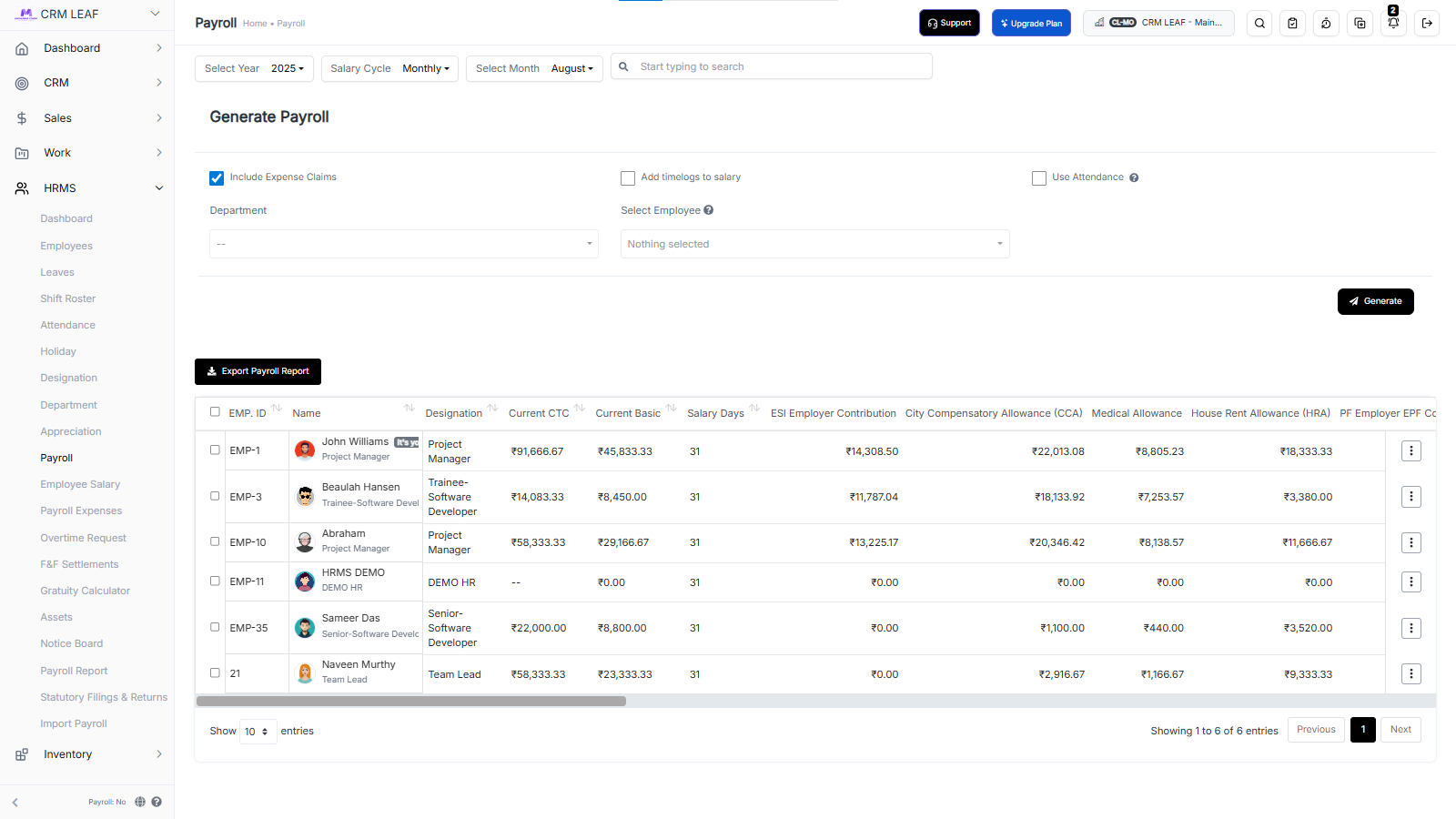
PPC Page Enhancements
PPC pages were improved for better performance, design consistency, and alignment with updated marketing structure and flow.
Responsive UI Fixes
Several UI components were optimized for mobile scaling, ensuring uniform display across tablets, desktops, and smaller screens.
Payment Gateway Added
A new payment gateway integration has been added, enabling faster subscription checkout and billing automation.
Client PDF Report
Users can now generate detailed client PDF reports with structured layout, faster processing, and audit-friendly design.
Removed Google Signup
Google signup option was removed to avoid conflicts and improve login security and reliability.
Settings UI Updates
The company settings panel has been redesigned for better field grouping, clarity, and faster configuration.
New UI Framework Rollout
A refreshed UI framework and structure were deployed with enhanced styling, updated layout logic, and improved brand consistency across CrmLeaf.
Footer & Sitemap Updates
The footer navigation and sitemap structure were updated to support better content discovery and SEO indexing.
New Dashboard UI
A brand-new dashboard experience is live with improved visual layout, chart clarity, and task overview elements.
Signup Newsletter Opt-In
New users can now choose to opt-in to product updates during signup for tailored communication.
Onboarding UI Enhancements
The onboarding experience has been refined with improved sidebar layout and navigation guidance.
Use Case Pages Added
Multiple use case pages were added to help users quickly map CrmLeaf features to real business operations and workflows.
Enhanced Meta Structure
SEO scripts and metadata enhancements were deployed for better search visibility and improved ranking in product-related searches.
Sample Data Added
New accounts now get sample CRM data on signup so users can explore workflows without starting from scratch.
Live Tracker Map
Live Tracker Map introduced for real-time task and lead tracking with improved accuracy and location-based context.
UI Enhancements
Several smaller UI refinements were rolled out, including updated icons, login fixes, and improved lead handling screens.
Feature Page Fixes
Feature pages were improved with corrected logic, updated UI components, and optimized CTA placements to boost conversion and clarity.
Signup UI Improvements
The signup screen received a UI refresh with clearer form layout and validation improvements.
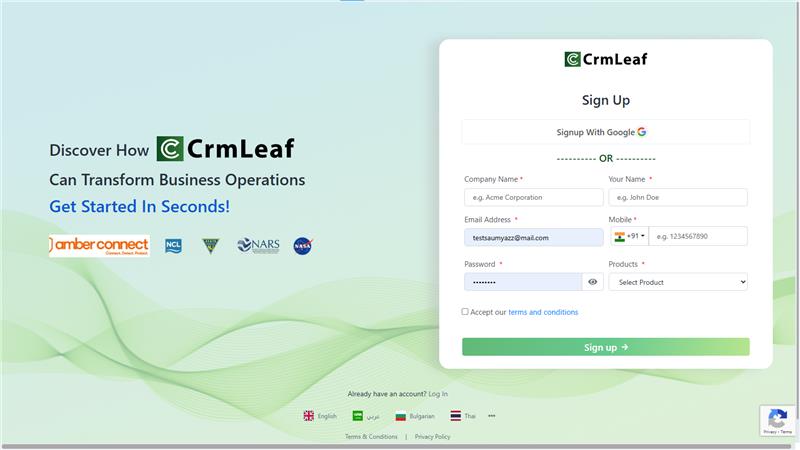
Custom Leads & Inventory
Customizable lead and inventory settings introduced to support unique business workflows and dynamic field mapping.