

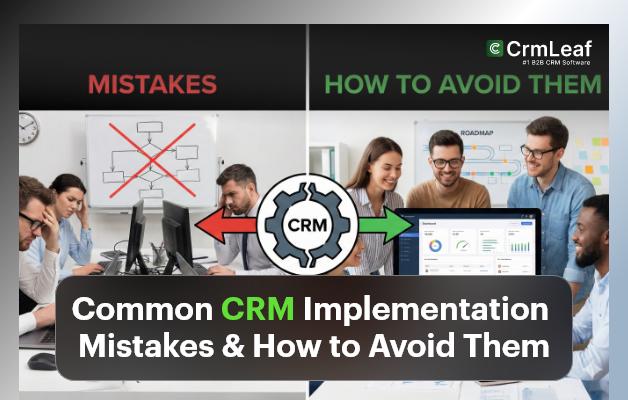
CRM software promises better customer experience, higher sales productivity, and seamless collaboration across teams. But the reality? Over 50% of CRM projects fail to deliver expected results — not because of the software, but due to avoidable CRM implementation mistakes.
Companies often rush into CRM deployment with unclear goals, poor planning, and zero user adoption strategy — leading to wasted budgets, frustrated employees, and low ROI.
In this comprehensive guide, we’ll break down the most common CRM Implementation Mistakes and give you practical solutions — so your CRM project becomes a long-term success story powered by platforms like CrmLeaf’s unified CRM + ERP system.
Why CRM Implementation Matters More Than Selection
Selecting a CRM is only step one. Success depends on:
- Proper data migration
- Workflow alignment
- User adoption and training
- Continuous optimization
A CRM is not just a tool — it’s a business transformation enabler. Avoiding common pitfalls ensures your teams gain automation, visibility, and productivity from day one.
Top CRM Implementation Mistakes
Below are the biggest CRM Implementation Mistakes businesses make — and your blueprint to avoid them.
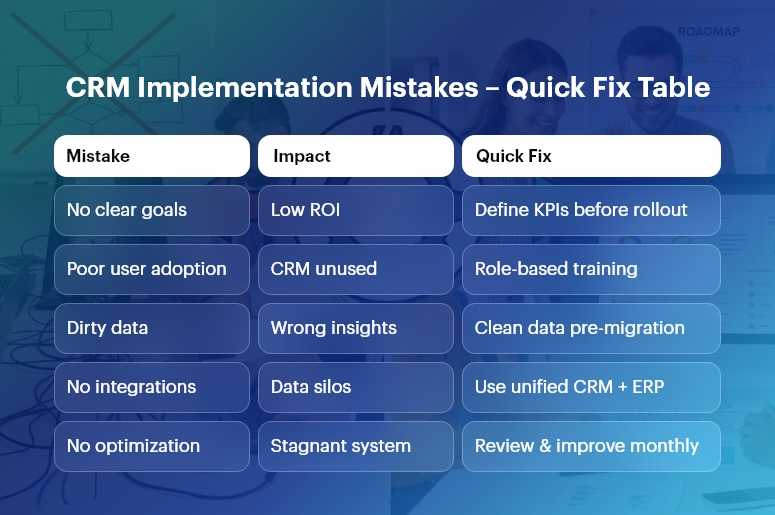
No Clear Objectives or Measurable KPIs
Businesses often start CRM implementation without knowing what they want to fix.
How to avoid it:
- Define success metrics before implementation
- Align goals with revenue, service, and operational improvements
- Use CrmLeaf dashboards to track KPIs in real time
Poor User Adoption
Employees avoid using CRM if:
- It’s complicated
- They weren’t trained properly
- They don’t understand the value
How to avoid it:
- Involve end users from the requirements stage
- Simplify forms and automate manual tasks
- Provide role-based training inside CrmLeaf
Underestimating Data Migration Challenges
Copy-pasting from spreadsheets into CRM often creates duplicate, outdated, or incorrect records.
How to avoid it:
- Clean, validate, and de-duplicate data before import
- Standardize formats (emails, phone numbers, names)
- Use CrmLeaf’s automated validation rules
Clean data = better analytics & forecasting
Lack of Integration with Other Systems
When CRM doesn’t connect with:
- Inventory
- HRMS
- Finance
- Communication tools
…you’re right back to data silos.
How to avoid it:
- Choose a platform like CrmLeaf CRM + ERP, designed for full workflow automation
- Enable API-based and native integrations
- Sync everything — orders, invoices, leads
Automating Broken Processes
Digital transformation shouldn’t mean copying messy spreadsheets into CRM.
How to avoid it:
- Re-engineer processes before automation
- Create standardized workflows and approval chains in CrmLeaf
- Test with live scenarios
Ignoring Change Management & Communication
The biggest reason for CRM resistance: fear of change.
How to avoid it:
- Highlight CRM benefits for each team
- Communicate updates frequently
- Celebrate early wins
“This tool reduces your workload” > “Just use this new CRM”
Skipping Role-Based Permissions and Security
Everyone having full access = major security risk.
How to avoid it:
- Define access levels by department and role
- Use CrmLeaf’s encryption and audit logs
- Enforce security policies for compliance
Lack of Ongoing Improvement
A CRM is not “set it and forget it.” Business needs evolve — so should workflows.
How to avoid it:
- Review analytics monthly
- Add automation based on performance trends
- Use CrmLeaf customer success support for continuous optimization
Mini Checklist for CRM Success
| Must-Do | Why It Matters |
| Executive sponsorship | Mandatory for alignment & budgets |
| Clear goals | Higher adoption & faster ROI |
| Clean data | Avoids reporting errors |
| User onboarding | Boosts utilization |
| Continuous enhancement | Maximizes long-term value |
Follow this checklist, and CRM failure becomes highly unlikely.
How CrmLeaf Prevents CRM Implementation Mistakes?
A distribution company switching from spreadsheets struggled with low lead conversion and order delays. With CrmLeaf:
- 40% faster order-to-cash cycle
- 33% higher lead conversion rate in 90 days
- 100% accurate inventory visibility
CrmLeaf ensures:
- Automated workflows across CRM, Inventory, Projects, HRMS & Finance
- Guided implementation with expert support
- Scalable modules that grow with your business
Key Takeaways – Avoid CRM Implementation Mistakes
- CRM failure usually results from planning mistakes, not technology
- Clear goals, clean data & user adoption determine success
- A connected system like CrmLeaf eliminates silos and maximizes ROI
- Ongoing improvement is essential for future readiness
When implemented correctly…
A CRM is the growth engine for your business.
Ready to Implement CRM the Right Way?
Choose CrmLeaf and avoid the biggest CRM Implementation Mistakes with expert guidance and a unified CRM + ERP architecture.
- Free Trial
- Guided Setup
- 360° Business Automation
FAQs
Why do CRM projects fail most of the time?
Because of unclear goals, poor adoption, and messy data migration.
How can CrmLeaf improve CRM success rates?
By offering automation, integrations, and guided onboarding tailored to each department.
How long does CRM implementation take?
With phased rollout in CrmLeaf — productivity gains often appear within 30–60 days.
Does CrmLeaf help with data migration?
Yes — including de-duplication, field mapping, and governance controls.
What should companies fix before CRM automation?
Broken spreadsheet processes, inconsistent data, and undefined approval rules.